Searching Your Archive
You don't remember your life by keyword. You remember who was there, roughly when it was, maybe where, and a few words of what happened. Ember's search is built around exactly that. Press ⌘K and type it the way it comes to mind.
Opening search
Press ⌘K from anywhere in Ember. Start typing and results update as you go. Use ↑ and ↓ to move through them, ↵ to open one, and Esc to close search.
One box searches everything: people, worlds, tags, stories, journal entries, interactions, notes on a person, and how you met.
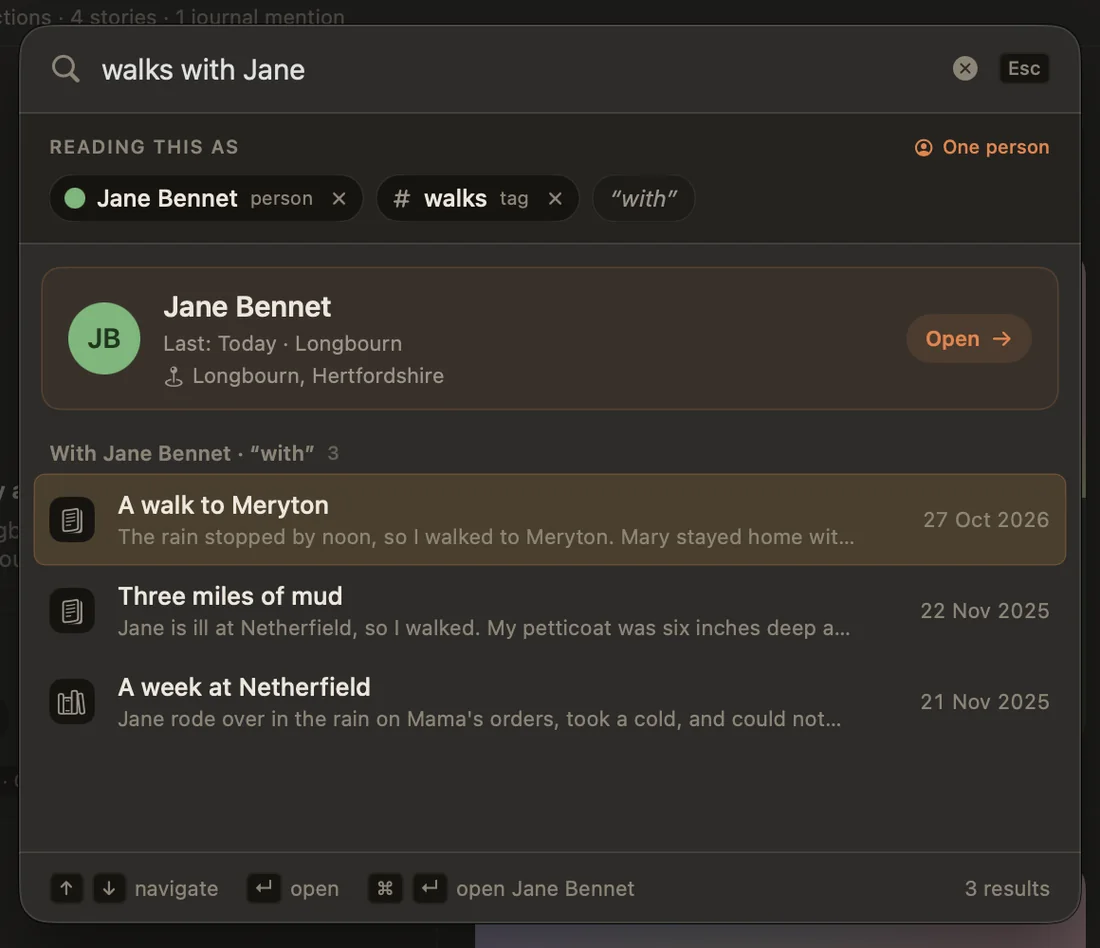
"Reading this as"
As you type, Ember picks your query apart and shows how it understood it in a row of chips under the search box, labeled READING THIS AS. Type sarah tokyo last year summer ramen and you'll see something like:
| Chip | From |
|---|---|
| Person | sarah → Sarah Chen |
| Place | tokyo |
| Time | last year summer → Summer of last year |
| Topic | “ramen” |
Nothing is hidden: if Ember read a word the wrong way, you can see it, and you can fix it. Click the ✕ on any chip to drop that reading, and the results update straight away.
When a word could mean two things (say you have a world called College and you also met people at college), Ember shows both chips instead of guessing. Remove the one you didn't mean.
Search by person
Type someone's name, or any one of their names or nicknames, and search stops being a list of files. It becomes your history with that person: the journal entries they're in, the stories you share, your interactions, your notes about them, and how you met, all in one timeline.
Add a time or a topic to narrow it down:
sarah: your whole history with Sarah.sarah 2024: everything with Sarah in 2024, even entries that never mention the year in their text. Ember goes by each entry's date.sarah wedding: only the moments with Sarah that mention a wedding.mom lately: works just as well with a nickname.
If nothing matches, Ember says so plainly ("Nothing recorded with Sarah in 2019") instead of showing you something unrelated.
How names are read:
- Full names come first.
sarah chenpicks Sarah Chen even if you know three Sarahs. A first name, a last name or a nickname on its own works too. - One name, two people. If
sarahfits two or three people, you see a chip for each and get moments with either of them. Remove the Sarah you didn't mean. - Two names, both people.
sarah johnshows only the moments they shared, across your whole archive, including stories they're both on even when neither name is written in the text. - A very common name word. If a word fits more than three people (a surname the whole family shares, say), it becomes one chip listing all of them instead of a chip each. Pick a person from it to narrow down. Until you do, the word is searched as plain text.
- Times win over names. With a friend called Summer,
summer 2019still means the season. Remove the time chip and the word goes to your friend.summer lee, a full name, always means the person.
Search by time
Type only a time, and Ember walks you through that stretch of your life: every entry, story, and interaction from then, grouped by month. It also shows two things only Ember can tell you:
- Who you saw most in that stretch.
- Who you've drifted from since: people who were part of that time and are now fading.
The kinds of time Ember understands:
| Type | Examples |
|---|---|
| A year | 2019 |
| A season | summer, winter 2021, last summer, this summer |
| A month | march, august 2023, last march, sep 2020 |
| A season or month of a year | last year summer, this year march |
| A specific day | march 5 2020, 5th march 2020, december 25, sep 5 |
| A range | 2019 to 2021, 2019-2021, between 2019 and 2021, from march until june 2020, march 5-10 2020 |
| A decade | the 90s, 1990s, 80s to 90s |
| Time ago | 3 years ago, a year ago, 2 months ago, two weeks ago, 5 days ago, a few years ago, a couple of years ago |
| Roughly | around 2019, circa 2019, ~2019, around march 2020 |
| Part of a period | early 2020, mid-2020, late 2020, early 90s, late march 2021 |
| Holidays | christmas 2019, diwali, eid, last new year's eve, christmas week, diwali month (see below) |
| Birthdays | sarah's birthday, mom's birthday 2022 |
| A story | before the wedding, during the japan trip (see below) |
| Calendar periods | today, yesterday, this week, last month, this year, last year |
| Recent | recently, lately (the last 30 days) |
A few details, so the results never surprise you:
- "Ago" means the whole period.
3 years agois all of that calendar year (the chip reads 3 years ago (2023)), because that's what people usually mean.2 months agois that whole month. - Ranges fill in missing years.
march to june 2020is March to June 2020, andnovember to february 2020runs across New Year, from November 2019. - A day without a year, like
december 25, means the most recent one, never one in the future. - "Last" means the most recent one that's over. In September,
last summeris the summer that just ended. In July, it's the summer before.this summeris always this year's. - "Around" goes one step wider than what you typed. A year gets a year either side (
around 2019is 2018 to 2020), a month or a season gets a month either side, and a day or a holiday gets a week either side. - Early, mid and late split a period into thirds.
early 2020is January to April,mid 2020May to August,late 2020September to December. For a decade:early 90sis 1990 to 1993,late 90s1997 to 1999. For a month: the 1st to 10th, 11th to 20th, and 21st to the end. - "A few" is 2 to 4, "a couple" is 1 to 3.
a few years agocovers the three whole years from four years back to two years back. - An age is not a decade. Short forms work for
60sto90sand00s/10s, but not after "my" or "her", soin my 60sstays as words. For the 1920s to 1950s, or the 2020s, write all four digits. - Seasons follow your hemisphere, so if you live in Australia,
summermeans December to February. Periods like last month and this week are real calendar periods, not "the last 30 days". - Short month names need a number.
sep 2020andsep 5are dates, but a barejanormarstays a word, since it's just as likely a name. - One time per search. If you type two, the first one Ember recognizes is used. For a stretch of time, write it as a range:
2019 to 2021.
Several people and a time work too: sarah john 2005 walks that year, showing only the moments that included both of them.
Birthdays use the birthday saved on the person: sarah's birthday shows the moments around every one of her birthdays (the day, plus a day either side), and adding a year narrows it to that one.
Whatever you type, the time chip shows exactly how Ember read it. If it's wrong, remove it with ✕ and the words go back into the topic.
Search by what happened
Anything that isn't a person, a time, a place, or a filter is treated as the topic, and Ember searches the text of your entries, stories, and interactions for it. Topic search is deliberately forgiving:
- Every word counts, in any order. Each word you type has to appear somewhere in the moment, but not next to each other.
scared of lifefinds "life has me scared". - Little words are skipped. Words like the, of, with, my and about don't have to match, so they never hide a result.
- Word forms match.
walkingfinds "walked" and "walks", and a word you're still typing finds the words it starts. - Accents don't matter.
cafefinds "café", andcaféfinds "cafe". - Typos are caught when they need to be. If the word you typed appears nowhere in your archive, Ember looks for near spellings (
resturantfinds "restaurant") and for longer words that contain it (storefinds "bookstore"). If the word is in your archive, it's matched as you typed it, sonightdoesn't also bring up every "right" and "light". Words under four letters are never treated as typos. - Best matches come first. Results are ranked by how well they match, and matching words are highlighted in each preview.
People and dates, on the other hand, are matched exactly. A misspelled name won't quietly send you to the wrong person. Precise about who and when, forgiving about what.
sad won't find "gloomy". Ember matches the words you actually wrote.Holidays
Type a holiday and Ember finds the moments around it. With a year (diwali 2023) you get that one; without a year (christmas) you get every one in your archive, so you can walk through all your Christmases side by side.
| Kind | Holidays |
|---|---|
| Fixed dates | Christmas, Christmas Eve, New Year's Eve, New Year's Day, Valentine's Day, Halloween |
| Calculated | Easter, Good Friday, Thanksgiving (US and Canada, by your region) |
| Islamic | Eid al-Fitr, Eid al-Adha (bakrid works too), Ramadan. A bare eid means both Eids. |
| Chinese | Lunar New Year, Mid-Autumn Festival |
| Jewish | Rosh Hashanah, Yom Kippur, Hanukkah, Passover |
| Hindu | Diwali, Holi, Dussehra, Ganesh Chaturthi, Raksha Bandhan, Pongal |
Each holiday covers a few days, not a single date: Diwali is all five days, Hanukkah and Passover are the whole festival, Ramadan is the whole month, and most others are the day plus a day either side. That's on purpose. Some holidays are observed on different days in different places, and people often write about a celebration the next day.
Want the days around it too? Add week or month. christmas week (or week of christmas) is the calendar week Christmas falls in, and diwali month is the month Diwali falls in that year, which helps for festivals that move around the calendar. It works with or without a year, and with last, this and around: last christmas week. A holiday that is already that long stays as it is, so ramadan month is simply Ramadan.
diwali still finds every entry that mentions Diwali by name.Search relative to a story
Your stories are the landmarks of your life, so you can search around them. Type a story's title and Ember shows it as a story pill under the search box, so you know it was recognized:
| You type | Ember searches |
|---|---|
before the wedding | the 3 months before the story starts |
after the wedding | the 3 months after it ends |
during the japan trip, or just japan trip | the story's own dates |
since the move | from the end of the story until today |
It combines with everything else: sarah before the wedding, photos during the japan trip. A short, one-word title (a story called "Home") is only recognized with before, after, during or since in front of it, so it doesn't take over every search for that word.
Photos, weather and time of day
Add any of these to a search to narrow it down. Each one appears as its own pill, so you can remove it with ✕.
| Filter | Words | Keeps |
|---|---|---|
| Photos | photos, pictures, pics, images, selfies | entries and stories with a photo |
| Videos | videos, clips | entries and stories with a video |
| Songs | songs, music | entries and stories with a song |
| Weather | rainy, drizzle, snowy, stormy, thunder, foggy, windy, cloudy, overcast, sunny, sunshine, hot, heatwave, cold, chilly, freezing | journal entries with that weather saved |
| Time of day | morning, afternoon, evening, night, late night, midnight | moments written or logged at that time |
| Day of the week | sunday (any day), weekends, weekdays | moments on those days |
For example: photos from summer 2019, rainy sundays, late night, videos with sarah. On their own, filters search your whole archive, newest first. Filters of different kinds all apply together, but only one of each kind is used: rainy sunny keeps one weather, not both.
Words in your photos are searched too. Ember reads the text in your photos on your device (a menu, a sign, a handwritten card), so searching for a word that appears in one finds the entry or story it's in, marked In a photo: …. Open it and the matching words are outlined on the photo. See Photos, Voice & Songs.
- Hot and cold read the temperature saved on the entry: 28° and above is hot, 8° and below is cold (82°F and 46°F in the US).
- Mornings are 5 to 12, afternoons 12 to 5, evenings 5 to 9, and nights 9 until 5 in the morning. Entries imported with a date but no time are left out of time-of-day searches, rather than counted as midnight.
Firsts and lasts
Add first or last time to put the oldest or the newest moment at the top: first time with sarah, last time with john, my first entry, latest photos. earliest, oldest, most recent and newest work too. last year and last summer still mean a time, not an order.
Exact phrases
Sometimes you remember one exact sentence. Put it in quotes, "you'll be fine", and Ember finds only the moments where those words appear together, in that order. Nothing in quotes is read as a person, a date, or a filter. You can combine quotes with anything else: sarah "you'll be fine".
Someone's connections
Type sarah's connections (or connected to sarah, linked to sarah) to see everyone Sarah is linked to on your graph, with the note on each link and when it began. Links that have ended are listed after the current ones.
Places and music
Places. Entries, stories, and people with a location can be found by any level of it: the place name, city, region, country, or continent. kyoto, japan, and asia all find the same trip. Places you've used before are recognized and shown as a chip.
Music. Songs you've attached to an entry or story are searchable by title, artist, or album. Type the artist and you'll find the entries where their song is.
Worlds, tags and where you met
Type the name of a world, a tag or a "where it started" label (college, work, walks) and it becomes a chip that narrows the results. A moment passes if it's tied to that label (tagged with it, or with someone from that world on it), or if its text says the word.
- Each label adds its own section to the results: the people in that world, the people you met there, or everything carrying that tag, newest first.
- Two labels, both needed.
work walkskeeps moments that answer to Work and to walks. - One word, two readings. If
collegeis both a world and a "where it started" label, you see both chips, and a moment that answers either one counts. Remove the reading you didn't mean.
How the pieces combine
Everything you type is read as one search. Every piece narrows it further: a person, a time, a place, labels, filters and topic words all have to match together. What Ember shows depends on what it found:
| Your search has | You see | Example |
|---|---|---|
| connections and one person | who that person is linked to | sarah's connections |
| one person | your history with them, narrowed by anything else you typed | sarah rainy 2022 |
| a time, with nobody or with several people | that stretch of your life, month by month, narrowed to moments they shared | summer 2019, sarah john 2005 |
| a filter or a quoted phrase, with no time | your whole archive, newest first | photos, "you'll be fine" |
| two or more different people, with no time | everything they shared, across your whole archive | sarah john |
| anything else | the results list, best matches first | ramen, college |
So sarah rainy sundays 2022 climbing opens your history with Sarah, showing only moments from 2022, on a rainy Sunday, that mention climbing (or climbed, or climbs).
The results list
The results list always searches your whole archive, however far back it goes. On a very large archive the newest moments show up first, and while older ones are still being read you'll see Looking further back… at the bottom. Their results join the list by themselves.
- Grouped by kind. People, worlds, tags, stories, journal entries and interactions each get a section with the best five. Click Show all to see the rest.
- Every row says why it's there: the line of text that matched, the place, the song, or the detail on a person (like Location: Chennai, India).
- Very broad searches are capped at 200 of each kind. Ember tells you how many there really are ("Showing 200 of 1,240") so you can add a word or a year to narrow it down.
Private by design
Search runs entirely on your device. Nothing you type is sent anywhere, there's no search server, and no AI reads your entries to answer it. Ember understands your query using what it already knows about your life, like your people, your worlds, your stories and your dates, plus the calendars built into your device, and nothing else. See Privacy & App Lock.
Tips
- Add nicknames to people ("Mom", "Amma", "Grandpa Joe") so search knows every way you refer to them. See Find People in Journal.
- Imported from Day One? Tagging people in your old entries makes
name + yearsearches work across your whole history. - If a result list looks wrong, check the chips first. It's usually a word that was read as a name or a world.
- Times, holidays, filters and connections are read in English, even when Ember is set to another language (search shows a note saying so). Names, places, labels and the words you wrote are found in any language.